home
the home of antique clocks


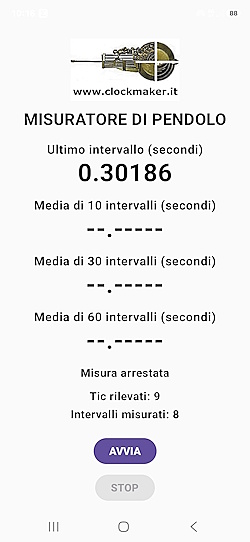
  • What it is: an Android app that listens to the ticking of a pendulum clock and measures oscillation duration, showing averages over 10, 30, and 60 intervals.
    It is very useful because it also allows you to put a clock precisely in beat by verifying the equality of two contiguous swings.

  • How to install: Follow the instructions below.

  • Limitations: accuracy depends on your phone's microphone. Good for a quick check, not for laboratory measurements. A quiet environment is needed.

  • Privacy: the app uses the microphone only to hear the ticks; it does not record or transmit anything.
app

Note: this app is free and provided “as is”, without warranty of any kind. Readings are indicative only: they depend on the microphone and the phone used, and are not a substitute for professional instruments. The author accepts no liability for any damage resulting from its use. Privacy: the app uses the microphone only to detect the clock’s ticks; audio is processed on the phone and is not recorded, stored or shared with anyone. The app collects no personal data.


download
click to download (ZIP file)


linea
Installation Instructions

Here is how to install the pendulum measuring app (Android phones only).

1) DOWNLOAD THE FILE
Download the app's ZIP file. Once downloaded, open it to extract the .apk file contained within.

2) INSTALL IT
Open the "My Files" (or "Files") app, go to "Downloads" and tap the .apk file.
- If Android says installing from this source is blocked, tap "Settings" and turn on "Allow from this source".
- If a Google Play Protect warning appears, tap "Install anyway" (normal since it's not from Play Store).
- Tap "Install" and then "Open".

3) MICROPHONE PERMISSION
The first time you open it, the app asks for permission to use the microphone: tap "While using the app".


linea

| Versione Italiana | Home |